Predict the physical length, then predict what happens if the same pixel count represents a larger physical scale.
Experiment
Use 80 pixels and a 50 µm scale bar. Capture the result. Change only the bar to 100 µm and capture again. Explain why an image needs calibration. Then investigate the recorded micrograph in Understand and append a measurement record to your reflection.
Measure a cell against a scale bar
Worked teaching model · synthetic values · A synthetic cell drawing and scale bar share a uniform image scale. Pixel length is not physical length. This is a calibration exercise, not a microscope observation.
Reset keeps your prediction, captures and practice history.
Image calibration
The outline and bar use the same image coordinate scale. The oval is a teaching drawing, not a specimen image.
Calculated values on the same fixed scale
Row
Quantity
Value (µm)
1
Cell physical length
40
2
Scale-bar physical length
50
Cell length: 40.0 µm.
Length = cell pixels × (scale-bar micrometres / 100 pixels). Here 80 × 50/100 = 40 µm. Magnifying both the image and its bar does not change the physical size.
Captures preserve recipes and replay their calculated results. They are synthetic model evidence, not physical measurements.
Understand
A length needs a reference
Start with the synthetic drawing, not the word “magnification.” Its scale bar is 100 pixels long and represents 50 µm. Each pixel therefore represents 50/100 = 0.5 µm. An 80-pixel outline represents 80 × 0.5 = 40 µm.
The general rule is physical cell length = cell pixels × physical bar length / bar pixels. The ratio must come from the same image at the same scaling. A scale bar copied from another image cannot calibrate this one. In a real image, identify the cell boundary consistently and measure along the dimension you intend to report.
Enlargement does not create detail
Suppose software doubles both lengths: the outline becomes 160 pixels and the bar 200 pixels, while the bar still represents 50 µm. The result is 160 × 50/200 = 40 µm. The object has not grown. Enlarging a blurry image also cannot reveal two structures that were not resolved in the original observation. Magnification and resolution answer different questions. Background: OpenStax, studying cells.
Try the same arithmetic with a 90-pixel outline and a 150-pixel bar representing 30 µm. The length is 18 µm. Explain the unit cancellation before checking your result.
Report what was measured
For a calibrated image, record the image identifier, bar length, pixel measurements, boundary convention and uncertainty. If either endpoint is unclear by a pixel, reporting many decimal places suggests unsupported precision. A single outline does not establish typical cell size: measure several independently selected cells, explain selection, and retain unusual observations.
The first lab deliberately draws a synthetic outline. It teaches calibration but supplies no specimen evidence. The recorded-image investigation below adds a traceable observation and asks you to distinguish variation from measurement error; it does not establish practical microscope technique.
Why cell size changes the exchange problem
A larger cell has more boundary, but also more contents to supply. For a cube with side length s in micrometers, surface area is 6s² in square micrometers and volume is s³ in cubic micrometers. Area per volume is 6/s, with units of inverse micrometers. This cube is a geometric teaching model, not the outline drawn above.
Side length
Surface area
Volume
Area per volume
10 µm
600 µm²
1,000 µm³
0.6 per µm
20 µm
2,400 µm²
8,000 µm³
0.3 per µm
Doubling every dimension gives four times the area but eight times the volume. If demand per volume and supply per area stay constant, demand grows faster than supply. Membrane folds, elongated shapes and internal transport can change that comparison; this argument does not set one universal maximum cell size. Background: OpenStax, eukaryotic cells.
Predict before revealing: one cube of side 20 µm is divided into eight separated cubes of side 10 µm. What happens to total volume and total exposed area? Record the calculation and the assumption about exposed boundaries in your reflection.
Check the geometry and its limit
Total volume stays 8,000 µm³. The eight smaller cubes expose 8 × 600 = 4,800 µm², twice the original area. If cubes remain pressed together, their contact faces are not necessarily exposed to the surrounding medium. The conclusion depends on separation, equal permeability and comparable demand; it does not prove that a real cell should divide at this size.
Investigate a recorded specimen image
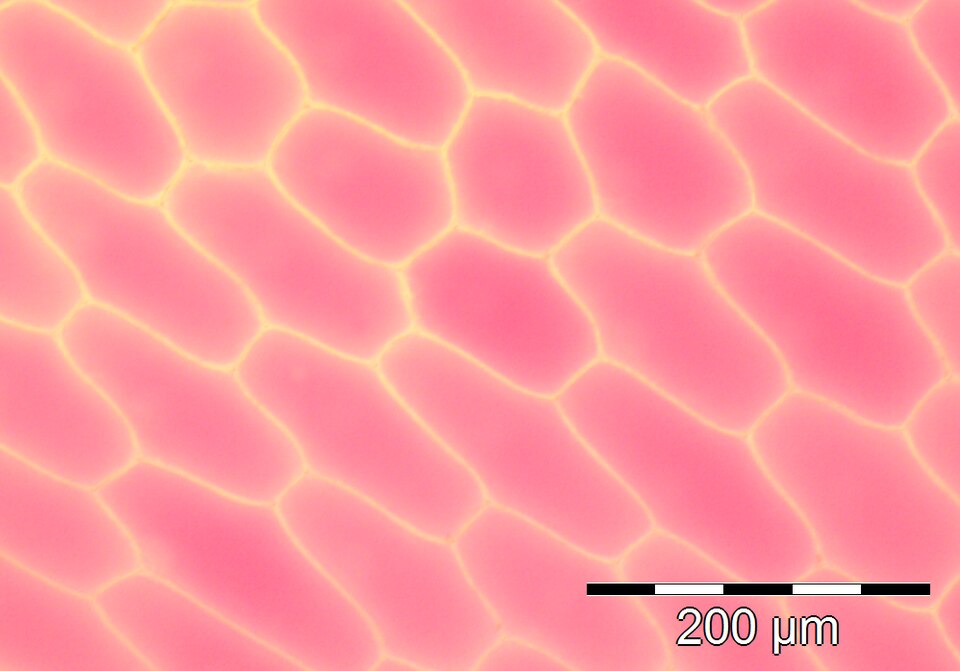
The following micrograph supplies a real field of cells. Start by separating what you can observe—outlines, contrast, relative positions and the scale bar—from what requires source information or additional measurements. Pink intensity is not a calibrated pigment assay, and an indistinct feature is not evidence that an organelle is absent.
Measure a recorded onion micrograph
This photograph is recorded biological evidence. The line and calibration bracket are movable teaching overlays. The starter endpoints are proposed boundary estimates, not an expert segmentation or a known true cell size.
Source: Adrian J. Hunter, Cells from a red onion epidermal peel (2014), CC BY-SA 3.0. The source identifies pigmented Allium cepa epidermal cells and a full 200 µm bar. This unchanged Wikimedia JPEG preview is 960 × 671 pixels; the original TIFF is 998 × 698. The image and annotated presentation are available under the same license. No endorsement is implied.
The image origin is its upper-left corner: x increases rightward and y downward. The full alternating black-and-white bar represents 200 µm; one segment is not the full reference. The bracket estimates the full span around its fixed center. Keep image and bar in the same coordinate system.
Selected line: 175.0 preview pixels = 101.7 µm. Scale: 0.5814 µm per preview pixel. Position-tolerance bounds: 98.3 to 105.3 µm.
Bounds allow each line endpoint and each bar endpoint to move within the selected pixel radius. They are geometric sensitivity bounds, not a statistical confidence interval or a complete instrument uncertainty. The source's nominal 200 µm value is assumed; its calibration error is not supplied here.
Controls are temporary; appending preserves the record as text in this lesson's existing reflection and science backup. It retains earlier writing, does not grade boundaries, and does not clear captures. Resetting controls does not remove appended records. If the reflection is full, edit it or copy the record separately.
For a nonvisual route, use the supplied candidate endpoints (275, 183) and (450, 183), a 344-pixel full bar, and the described diffuse boundary. Compare the computed lengths after shifting an endpoint or changing its tolerance. This assesses calibration reasoning; it does not independently assess visual boundary identification.
Make a repeatable measurement
Before moving endpoints, choose your quantity: a horizontal chord at a stated image row, a width through an estimated center, or the longest visible axis. Those definitions need not give the same length for an irregular cell. Do not call every line a diameter or use a two-dimensional line to infer a three-dimensional volume.
Hide the overlays and inspect the full scale bar. Record why the entire alternating bar, rather than one segment, corresponds to 200 µm.
State a boundary convention, such as the midpoint of the pale wall band. Position both endpoints under that convention. The initial candidate line is a starting estimate to critique.
Adjust the full-bar span against its visible endpoints. Explain why a change in your estimate changes the calculated length even though the specimen image is unchanged.
Choose a plausible endpoint-position tolerance and inspect the resulting bounds. Save a record, then add your convention and interpretation in the lesson reflection.
Repeat placement on the same cell without using the previous result as a target. Compare placement variability with differences between several other cells.
Describe your cell-selection rule and retain every selected result, including awkward boundaries. A few convenient, fully visible cells are not a random sample of all onion cells.
The same-cell repeats probe measurement repeatability; different-cell measurements in one field show within-field variation. Neither supplies independent specimens or a population-wide estimate. Cells cut by the image edge and indistinct boundaries also affect which cells can be measured. Record those exclusions instead of silently selecting the clearest or most typical-looking cells.
Understand the bounds
For line endpoints separated by a measured pixel distance d, and full-bar span b pixels, the length estimate is 200d/b µm. A tolerance radius e pixels for each endpoint can change the line distance by at most 2e. The two bar endpoints also allow a span change of at most 2e.
A conservative lower bound uses the shortest allowed line and longest allowed bar: 200 × max(0, d − 2e)/(b + 2e). The upper bound uses the longest allowed line and shortest allowed bar: 200 × (d + 2e)/(b − 2e). The controls keep the denominator positive. The same tolerance is assumed for line and bar endpoints here; that is a teaching simplification, not a measured equivalence.
For the starter coordinates, d = 175, b = 344 and e = 2 pixels. The estimate is approximately 101.7 µm, with geometric bounds about 98.3–105.3 µm. This calculation does not certify that the chosen endpoints represent the intended cell boundary. A poor boundary convention can give a precisely calculated wrong quantity.
Transfer: one learner measures the full bar as 344 pixels; another measures one fifth of that bar but still assigns it 200 µm. Both measure the same cell chord. Predict the direction and factor of the resulting error before reading the explanation.
Check the scale-reference error
The second learner divides by a bar-pixel length five times too small, so the reported cell length is five times too large. The specimen did not grow. If a single segment is used, it must be assigned the appropriate fraction of the full physical reference, and the equal-segment assumption must be checked.
For a complete evidence brief, include the image release ID, coordinates, bar estimate, tolerance, boundary convention, selection rule and a limited claim. Explain which extra observations would be needed to compare different specimens or establish practical microscope competence.
Apply
Public practice checks a specific claim. It does not establish independent mastery.
An image and its scale bar are both doubled in pixel size. Explain why the cell does not become physically larger. Identify one source of measurement uncertainty.
Continue
Completion requires a saved prediction, at least one capture and a reflection. Presence checks do not grade your reasoning.
Skipping retains experiments and awards no mastery.
Science work is stored locally in this browser, separately from mathematics and AI. It does not sync automatically. Use this science-only backup; this checkout's older all-subject export does not include science.
A legacy file is available only when the complete snapshot fits the 36 MB limit. For larger snapshots, prepare a complete file set below; never discard notebooks to make a smaller file.
Matching imported notebook drafts replace their current drafts. Omitted lessons and known first attempts remain. Export your current work first if you want to retain both drafts.
Complete file sets and course backups
A file set can hold more work than one science file. Keep its manifest and every part together. Each file is limited to 36 MB. This format needs this version of LearnAI or a compatible newer version; older versions can use only the legacy single-file backup above.
The set includes every saved science course and global continuation at this moment. Later edits need a new export. A conflicting tab exports its own visible work, which may differ from saved work in another tab.
0 file(s) selected. File order and filenames do not determine identity. Missing, changed or conflicting parts block the entire restore; no good part is applied by itself.
Science storage: loading. No account or remote computation is required.